
 Capture and visual intelligence
STELA SCOUT
STELA SCOUT captures real user journeys, interprets screens, and recognizes elements in a web application to turn that information into a useful foundation for STELA.
The browser extension records the navigation. Then, SCOUT inside STELA processes HTML, analyzes screens with computer vision, and helps automatically define elements under user supervision.
The capture extension is in the official publishing process for Chrome Web Store and Firefox Add-ons.
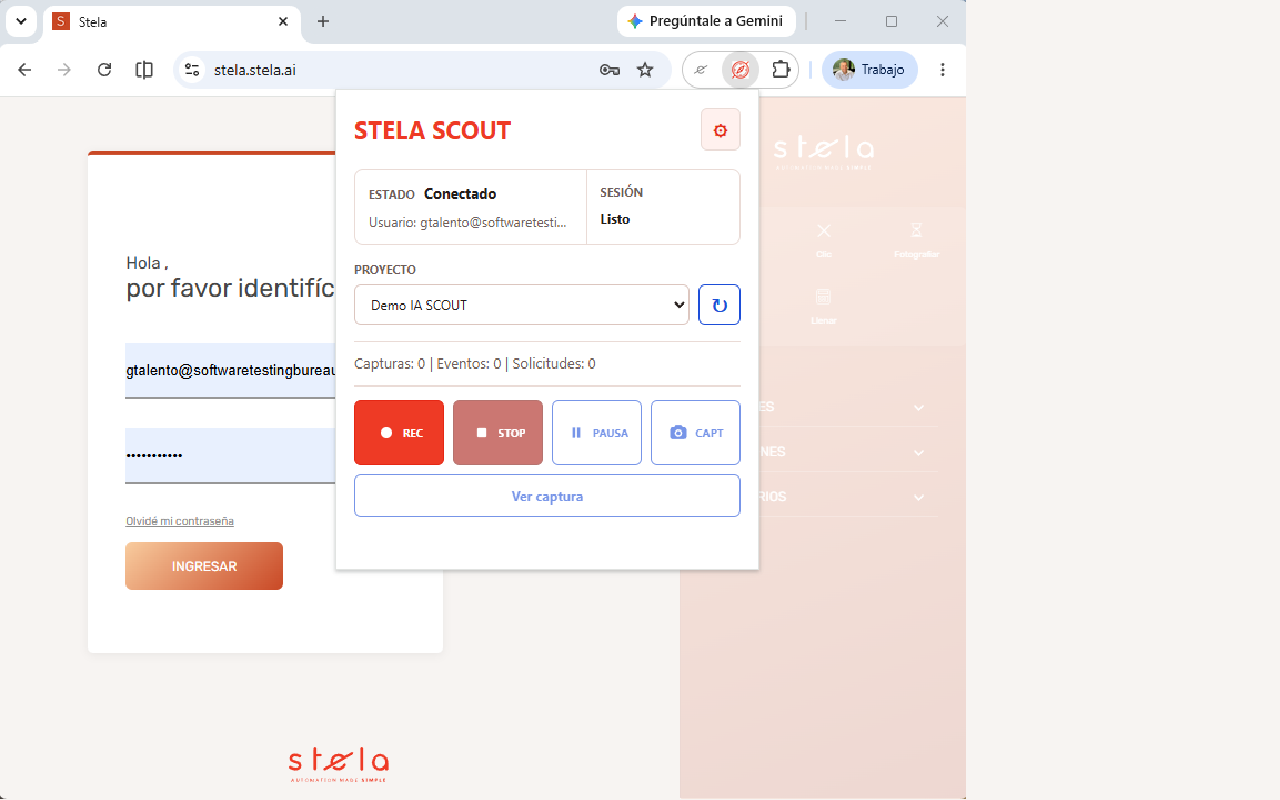
STELA SCOUT teaches STELA how a person works in a web application
STELA SCOUT follows the user journey, captures what happens in the application, and then processes that information inside STELA. The goal is not only to document navigation, but to understand screens, elements, and actions to accelerate the creation of intelligent automations.
STELA SCOUT captures the journey
The user navigates the application normally, and the extension records events, screens, HTML, and technical signals from the flow.
Interprets the interface
SCOUT processes HTML, analyzes screens with computer vision, and recognizes relevant elements in the application.
Prepares Robot Maker
The information validated by the user will become the foundation for SCOUT to command Robot Maker and generate test or RPA automations.
The extension captures, STELA SCOUT interprets
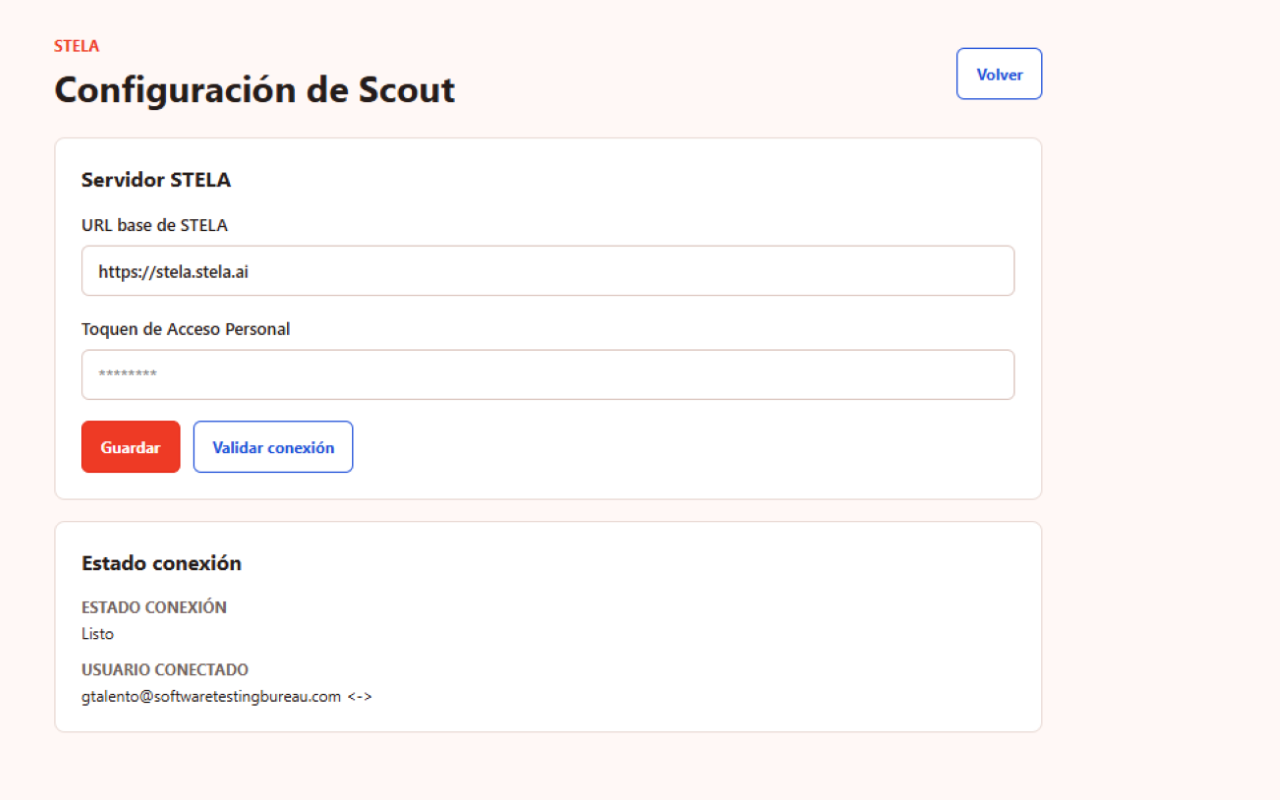
The extension is configured with the STELA base URL and a Personal Access Token. Once the connection is validated, the user selects a project and starts the journey that SCOUT will process inside STELA.
- Configure the corresponding STELA backend.
- Validate the connection using a Personal Access Token.
- List and select available projects.
- Start, pause, resume, and finish capture sessions.
- Send information for HTML, screen, and element processing.
SCOUT is the first step for STELA to transform real journeys into test automations, RPA, and future intelligent agents.
AI does not start from a blank page: it starts from the way people already work, navigate, recognize elements, and complete tasks inside their applications.
What STELA SCOUT processes
During an active session, SCOUT gathers visual, functional, and technical information. Then, inside STELA, that information is processed to recognize the interface and suggest automatable elements.
From capture to Robot Maker
SCOUT is designed to become the intelligent input for Robot Maker. Based on the captured journey, STELA will be able to identify screens, elements, and actions to generate automations according to the user-defined goal: software testing or RPA processes.
This automatic generation commanded by SCOUT is still evolving. This page presents the product direction and the first step already available: the structured capture of real journeys.
Control, privacy, and responsible use
Navigation capture processes information only when the user configures the connection, selects a project, and starts a session. The user can pause, resume, or finish the journey at any time.
- It does not read cookies, localStorage, or sessionStorage.
- It does not send information to advertising networks or third-party analytics services.
- It allows users to review a local diagnostic copy and export JSON.
- It must be used in applications and environments where the organization is authorized to perform the capture.
Important recommendation
Because SCOUT can capture screens, HTML, and journey events, we recommend pausing or finishing the capture before interacting with sensitive information that should not be recorded.
For production or non-local environments, we recommend using an HTTPS URL to protect data transmission to the configured STELA backend.
Frequently asked questions
A brief guide to understand the current scope of STELA SCOUT.
Does SCOUT automate processes by itself?
SCOUT already captures journeys and processes information to recognize screens and elements. The ability to command Robot Maker to generate test or RPA automations is evolving.
Do I need to know how to code to use SCOUT?
No. SCOUT is designed for functional users, analysts, testers, and business teams that need to capture journeys, review suggested elements, and prepare automations without writing code.
Which browsers does it work with?
The SCOUT capture extension has versions for Chrome/Chromium and Firefox, currently in the official publishing process in their respective stores.
Does SCOUT send data automatically?
No. Capture requires configuration, connection validation, project selection, and the user starting a session.
What does SCOUT do after capturing?
It processes HTML, analyzes screens with computer vision, and helps define application elements with user supervision.
What data does SCOUT not read?
SCOUT does not read cookies, localStorage, or sessionStorage.
What happens with sensitive information?
SCOUT can capture screens, HTML, and journey events. That is why we recommend pausing or finishing the capture before interacting with sensitive data that should not be recorded.
Learn how SCOUT connects human interaction with Robot Maker and STELA future agents
If you want to evaluate STELA SCOUT to capture journeys, recognize elements, and prepare AI-assisted test or RPA automations, let us talk.